AI Prompts for Recruiters: 12 Ways to Get More Out of Ask Spott
TL;DR
The best AI prompts for recruiters read like a brief to a sharp colleague: specific about the job, stage, client or time frame, and clear about what you want back. In Ask Spott, five habits make the biggest difference:
- Be specific. Name the stage, job, company or time frame you mean.
- Start from the record. Ask AI on a candidate or job already knows who you're talking about.
- Chain the steps. Find, import and shortlist in one request.
- Check before you approve. Read the approval request and click the sources.
- Save what you repeat. Turn recurring requests into skills, and tell Ask Spott your preferences once.
New to Ask Spott? Start with what Ask Spott is and everything it can do. This guide is about getting the most out of it, one prompt at a time.
What are the best AI prompts for recruiters?
The ones that map to real work on your desk. Here's a prompt for every step, from the first call to the numbers. Copy them as they are, then swap in your own clients, roles and candidates.
| Step | Try this | What you get back |
|---|---|---|
| Prospect | "Which clients haven't we spoken to in three months?" | Clients going quiet, ready for a check-in |
| Win the brief | "Any news on Halden Foods I can bring up today?" | Fresh talking points from the web before your call |
| Source | "Data engineers open to hybrid in Manchester" | Matching candidates from your own database |
| Screen | "Recap my last call with Emma" | The key points of the call, with sources |
| Match | "Who fits the Northwind role best, and why?" | A ranked shortlist with the reasons for each candidate |
| Present | "Make a branded shortlist for Lisa" | A shortlist document built on your workspace template |
| Place | "Move Emma to Placed and set a check-in" | An approval request for the move and the follow-up |
| Report | "How many candidates did we place this quarter?" | A straight number from your data |
The prospecting step deserves its own routine. If you're building one, here's how top agencies structure their BD process.
More prompts worth stealing
- "Did we discuss relocation to Dubai with anyone?" Then: "Where did he say that?"
- "Do we have any open jobs that would be a better fit for [candidate]?"
- "Check if these two resumes are a better fit for the job." (with the CVs attached)
- "Draft an email to each of the candidates asking if they're interested, and include a personalized fun fact."
- "Draft a 30-minute online call with [candidate] tomorrow at 3 PM about the [job] role."
- "Find the hiring manager for the [role] position at [company]."
- "Add these five candidates to a new list called 'Senior Java Q4'."
- "How many applications were in the Engaged stage but were withdrawn by the candidate?"
12 tips to get more out of Ask Spott
1. Be specific about the job, stage, client or time frame
Vague prompts get vague answers. The more of the brief you give, the less Ask Spott has to guess.
| Instead of | Try |
|---|---|
| "Find me some engineers" | "Give me the ten candidates we most recently spoke to who work in software engineering" |
| "Who's in the pipeline?" | "Who's in the Sourced stage for the Account Manager role at Northwind?" |
| "Write an email" | "Draft an email presenting the Senior Data Engineer shortlist to the hiring manager" |
2. Brief it like a colleague, not a search box
Don't translate your question into filters first. Ask Spott turns your sentence into Spott's own filters, and every filter is supported, so you can stack as many conditions as you like in plain language. You don't need exact names either: it handles typos and approximate job titles, so "the QA role at Northwind" finds the Quality Assurance Engineer job.
3. Start from the record you're working on
Open Ask AI in the side panel of a candidate, contact, company or job, and the context is already filled in. No need to repeat who you mean:
- "Recap his experience."
- "Compare this person to [other candidate]."
Use the main Chat for bigger questions across your whole database, and the side panel when you're deep in one record.
4. Ask for numbers, not just lists
Ask Spott counts as well as it searches. That makes it a quick way to sanity-check your pipeline before a team meeting:
- "How many applications are in the Engaged stage?"
- "How many applications were in the Engaged stage but were withdrawn by the candidate?"
5. Follow up in the same chat, start fresh for a new topic
Ask Spott remembers the conversation you're in, so short follow-ups like "Where did he say that?" just work. When you move on to something unrelated, start a New Chat. It keeps the answers focused.
6. Add context when the question isn't obviously about recruiting
Ask Spott is focused on recruitment work. If a question could look unrelated, say why you're asking:
"I'm working on a job for [client]. Did we ever discuss [topic] with anyone?"
7. Chain the steps in one request
You don't need one prompt per action. After Ask Spott finds open roles on a client's careers page, one reply can import them and match your candidates:
"Yes, these are relevant. Import them into Spott and give me a shortlist of the best candidates in my database for both."
Ask Spott checks whether the company already exists before it imports anything, so you don't end up with duplicates. And after every action, look at the suggested follow-ups underneath. Often the next step is one click away.
8. Let it draft, you send
Hand Ask Spott the writing, keep the judgment. When you draft for several candidates at once, each email is written individually, so personal details never mix between recipients. Nothing is ever sent automatically: you review each draft, tweak it and send it yourself. If a contact has no email address in Spott, Ask Spott tells you.
9. Read the approval before you click Approve
Every create, update, move or import comes with an approval request. Take two seconds to check the right records are changing. If you mention a stage that doesn't exist under that exact name, Ask Spott picks the closest match in your pipeline (ask to move a company to "the client stage" and it may land on "Customer"), so the approval is where you confirm it got it right.
10. Click the sources
When an answer is based on your records, the sources are listed underneath. Click through to check them, especially before you repeat something to a client. For calls, each snippet starts at the exact moment it was said. Like any AI, Ask Spott can make mistakes, and the sources are how you catch them.
11. Turn repeat work into skills
If you've typed the same instructions three times, make them a skill. Everyone starts with two: Prep my next meeting and Recap my last call. To create your own, give it:
- A name, like "Weekly pipeline check".
- A description of when to use it, like "Use this skill when I ask for my weekly pipeline check."
- The instructions, for example: "For each of my open jobs, count the candidates in every stage. List the candidates in Engaged or later that we haven't contacted in the last two weeks, and suggest a next step for each."
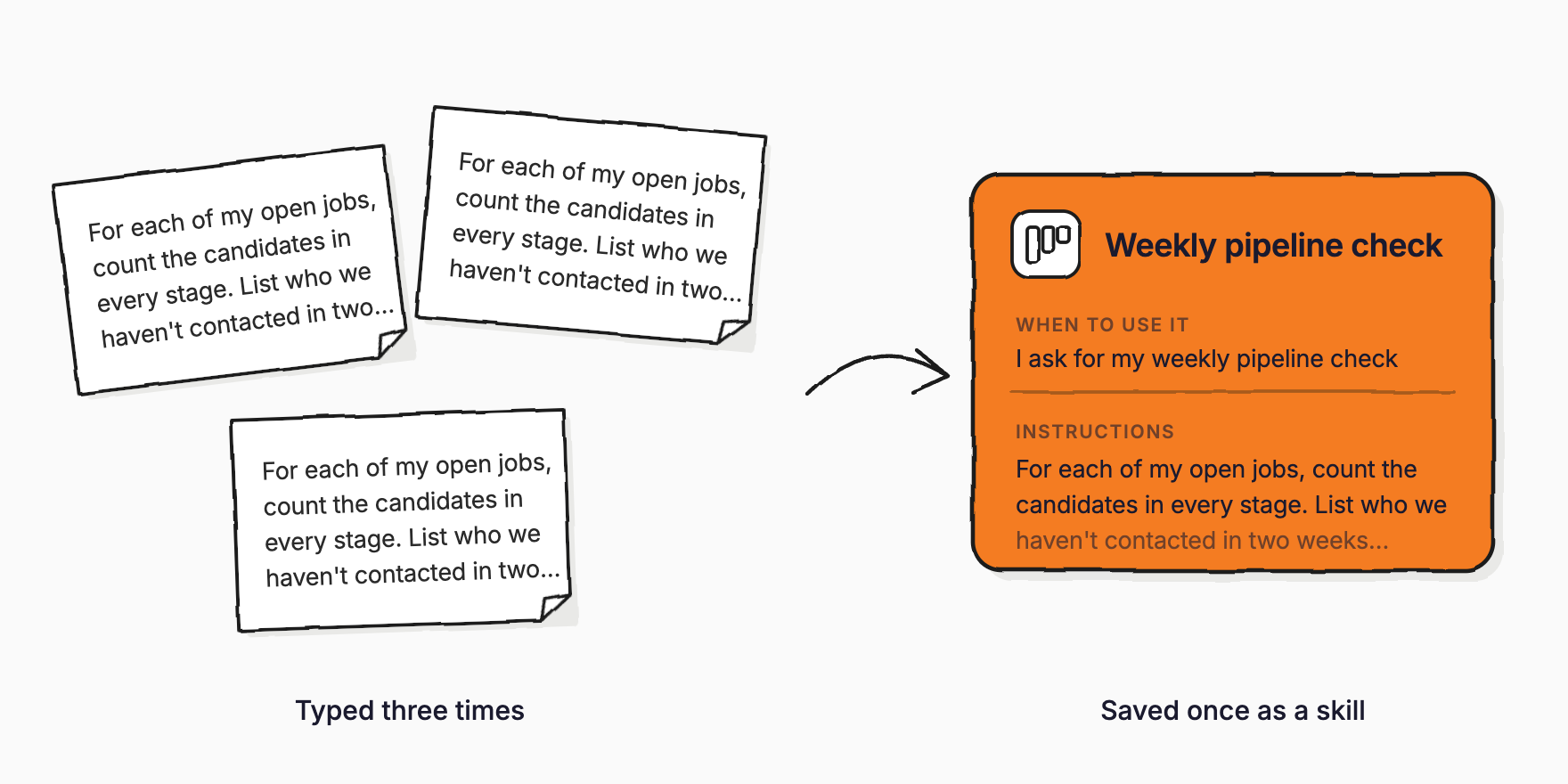
From then on, Ask Spott applies the skill whenever it fits, even if you don't name it. New skills are personal, and you can share them with your workspace once they work well. Good candidates for your first skills: a new job intake, a client check-in, a client shortlist and a candidate intro email. The skills guide has the details.
12. Tell it how you like to work
Ask Spott has a memory. Tell it a preference once and it applies it to every future chat:
- "Always keep my emails short and informal."
- "Always write my emails in Dutch."
- "Whenever I search for candidates, never put them in table form."
Changed your mind? Say so ("No, don't do this actually") and it updates or removes the memory. It also learns from how you work: if you always add a note after moving a candidate, it picks that up and suggests it. Memories you never use fade out.
What isn't Ask Spott built for?
Knowing the limits saves you time:
- Scanning the whole job market. Web search is built for targeted lookups, like one company's news, one careers page or one hiring manager.
- Sending things for you. Emails and invites always stay drafts until you send them.
- Instant answers on huge pools. Matching against a large pool of candidates takes a little longer than a regular search.
Can I use Ask Spott on my phone or in Claude and ChatGPT?
Yes. Pick up your chats in the Spott app for iOS and Android, and look up a client or a candidate between meetings. Our mobile recruiting playbook covers which moments are worth handling on your phone.
Prefer Claude or ChatGPT? Connect Spott through our MCP server and recruit from the chat you already use. There are setup guides for Claude and ChatGPT.
Put these prompts to work
Pick three prompts from the table above and use them this week: one to find, one to match, one to draft. Once you catch yourself typing the same thing twice, make it a skill.
Not on Spott yet? Book a demo to see these prompts run on your own data, or start a free trial.