20 Best Spott Automations You Can Build (Recruiting & Staffing)
Most ATS platforms store your data and wait. Spott is built to work for you between the clicks, quietly handling the admin so your recruiters spend their time on people and placements. The real question is not whether you can automate your workflow, it is which automations to set up first.
This guide gives you 20 Spott automations that recruiting and staffing agencies actually use, grouped by the four ways to build them: the no-code automation suite, webhooks, the API, and the MCP server for Claude and ChatGPT. For each one you get what it does, how it works, and why it is worth setting up. Most take minutes and no code.
TL;DR
Spott gives you four ways to automate recruiting work, and you can mix and match them:
- No-code automation suite - simple "when this happens, do that" rules your admin sets up in a few clicks. Great for the daily admin that eats recruiter time: welcome emails, placement confirmations, tidy pipelines, timely follow-ups.
- Webhooks - let Spott tell your other tools the moment something happens (a placement is made, a job opens), so systems like Slack or your invoicing tool react on their own.
- API - the developer's toolkit for deeper, custom connections: your careers site, a client portal, importing an old database.
- MCP server - connect Spott to Claude or ChatGPT and get work done just by asking, from finding candidates to writing your weekly numbers.
Start with the no-code suite for the everyday busywork, add webhooks and the API to connect the rest of your tools, and turn on the AI assistant for the thinking work that used to eat your mornings. The 20 below are grouped by tool so you can pick what fits your agency today.
The four ways to automate in Spott
Before the list, here is who each tool is for. Every automation below is tagged with the one you need.
A quick note: Spott keeps adding new automation options, so the exact list in your workspace may be bigger than what you see here. Open Settings > Automations to see what is available today. Everything below is built from things Spott already does.
The no-code automation suite (automations 1-8)
This is where most agencies start, and where most of the time savings come from. An admin turns it on under Settings, then builds each automation as a simple rule: a trigger ("when this happens"), one or more actions ("do this"), and optional conditions so it only runs when you want. No code, no developer.
Two things worth knowing. First, these rules apply to your whole workspace, so think of them as shared team habits, not personal shortcuts. Second, they come in three flavors. Some run silently in the background, some pop up the right window so a recruiter can finish a step, and some run on a schedule. The eight below are grouped that way.
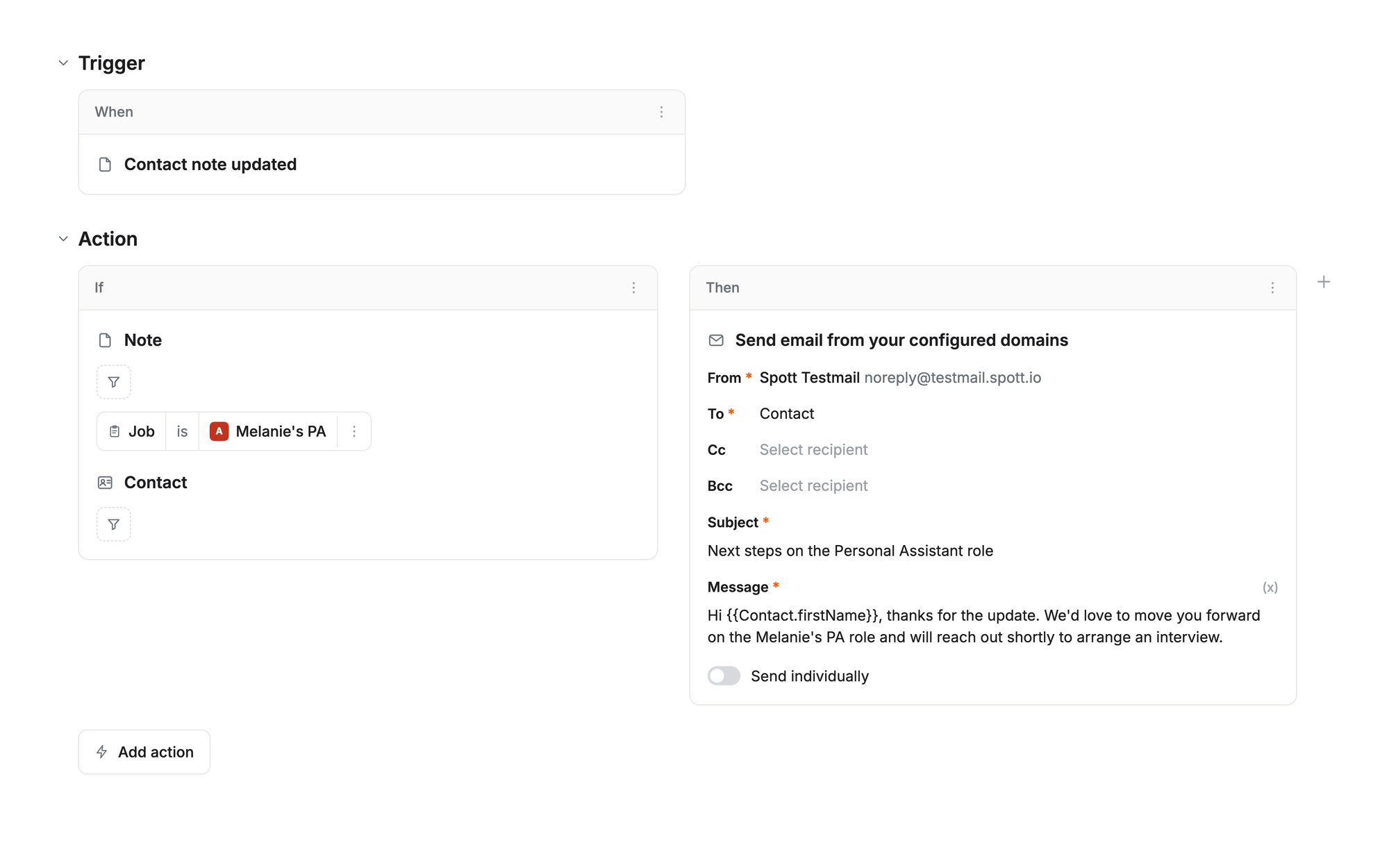
Runs silently in the background
These just happen. Use them when no one needs to review the step first and it should always run.
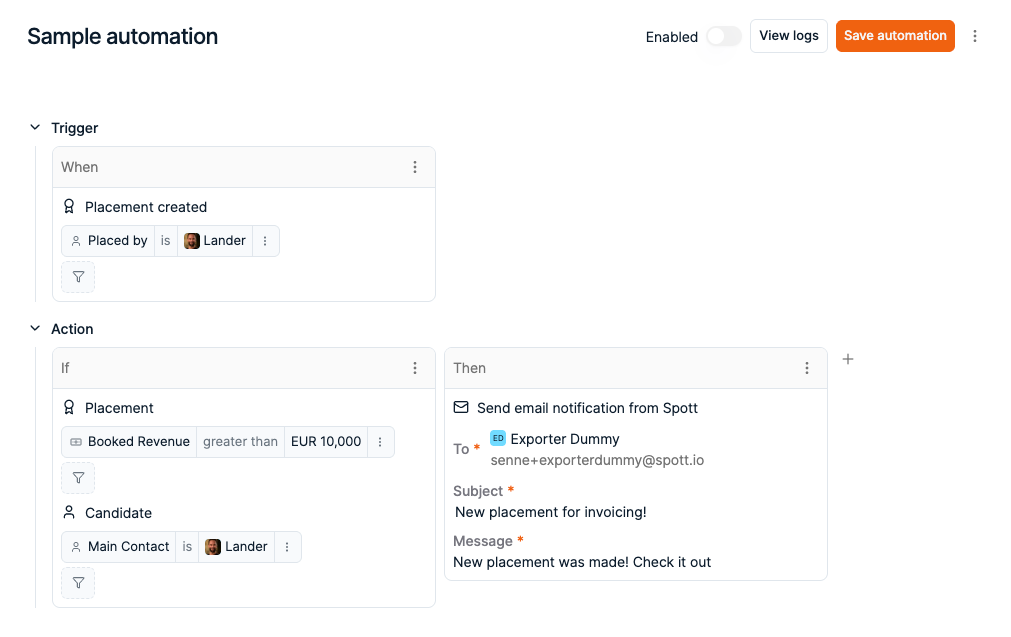
1. Send the GDPR consent email automatically
When: a candidate moves to your "GDPR check" stage. Then: Spott sends them a consent email from your own address.
Compliance outreach that runs itself. Every candidate who reaches that stage gets the right email, every time, and nobody on your team has to remember to send it. That is one less box to tick and one less risk to worry about.
2. Confirm every placement to the client
When: a candidate is placed. Then: Spott emails a confirmation to the client contact.
The placement is the moment that matters, so make the follow-through automatic. Your client gets a clean, on-brand confirmation the instant the deal is done, without a recruiter stopping to write it. Small touch, professional impression.
3. Close the job automatically when the role is filled
When: a candidate is placed on a job. Then: Spott sets the job's status to "Closed."
No more open roles lingering after they are already filled. Your live jobs reflect reality, your pipeline reports stay accurate, and nobody has to tidy up after the fact.
4. Keep your reporting fields up to date
When: an application reaches a certain stage. Then: Spott updates a field on the record (for example, a "Pipeline status").
The fields your dashboards rely on keep themselves current as candidates move. That means the numbers you show your team and your clients are trustworthy, without anyone doing manual upkeep.
Pops up the right next step
These open the window a recruiter was about to reach for anyway, so the person stays in control but skips the clicks. Use them when the step needs a human touch.
5. Open the placement form the moment you win
When: a candidate is dragged into the "Placed" column. Then: Spott opens the placement form so you can log the fee, start date, and details.
Moving a candidate to placed and recording the placement are really one action, so Spott opens the form for you. You fill in the details; you skip hunting for the button.
6. Open the email window at the right stage
When: a candidate moves to a stage where you always send an email (for example, "Mailed"). Then: Spott opens the email window, ready to go.
When a stage change should always be followed by a message, Spott puts the composer in front of you at exactly the right moment, so it never slips. (Loading a specific template into that window automatically is coming soon; for now you pick your template. For rejections, use the built-in reject action, which already handles the template for you.)
Runs on a schedule
These fire based on time passing rather than something a recruiter does, which lets you act on nothing happening: silence, inactivity, a candidate going cold. It is the automation most agencies ask for first.
7. Catch sleeping candidates before they go cold
When: you have not spoken to a candidate in a while (say 90 days). Then: Spott flags them, emails them, or moves them into a re-engagement list.
Your strongest past candidates quietly go quiet. Instead of only remembering them when a role gets urgent, Spott resurfaces them for you, so re-engagement becomes a steady habit and your talent pool stays warm.
8. Flag client contacts you have not spoken to lately
When: there has been no contact with a client for a set time (say six months). Then: Spott flags them for a check-in or notifies the owner.
Client relationships fade in silence. Let Spott watch for the gap and raise its hand, so your account managers reach out before a warm relationship goes cold and a competitor gets the next brief.
Webhooks: let Spott update your other tools (automations 9-12)
Webhooks are how Spott tells the rest of your tools that something just happened, the second it happens. An admin sets this up under Settings: pick the events you care about (a placement is made, a job opens) and where to send them. From there your other systems react on their own, so nobody has to keep checking Spott and copying things across by hand. Connecting to a tool like Zapier or Make means you can reach thousands of apps without any custom build.
9. Announce every placement in Slack or Teams
How it works: when a placement is made, Spott posts a message to your Slack or Teams channel.
Wins should be seen. Every placement lands in your team channel automatically, so the whole agency feels the momentum and leadership gets a live feed of results without opening a single report.
10. Kick off invoicing the moment a deal closes
How it works: when a placement is made, Spott sends the details to your finance or invoicing tool.
The gap between "placed" and "invoiced" is where money slips and finance ends up chasing recruiters. Close it by having the placement details flow straight into billing the moment the deal is done.
11. Keep another system in step with Spott
How it works: when candidates or contacts change in Spott, send those updates to your other system of record.
If part of your business still runs in another tool, keep it in step with Spott automatically. Changes flow across as they happen, so your two systems stop drifting apart and your team stops double-entering.
12. Feed a live dashboard, or connect almost anything
How it works: send the events you care about to a reporting dashboard, or route them through Zapier or Make to reach other apps.
If leadership runs on dashboards, stream your Spott activity into them in real time instead of exporting spreadsheets every week. And because Zapier and Make connect to thousands of tools, a single Spott event can trigger almost anything: a row in a spreadsheet, a contract sent for signature, a task in your onboarding tool.
The API: connect Spott to your own systems (automations 13-16)
The API is the developer's toolkit. It is how your developer (or ours) can connect Spott to systems that do not have a ready-made integration yet. You will not touch it day to day, but it is what makes the more custom automations below possible, so your data lives in one place instead of being copied between tools. If you do not have a developer, these are the ones to raise with us.
13. Sync your careers site and job boards
The idea: roles you open in Spott get posted to your careers site, and applicants flow straight back into the right pipeline.
Candidates apply wherever they find you, and your recruiters work them where they already live, with no copy-paste in between. Your website stays current automatically, and no application slips through the cracks.
14. Bring an old database or backlog into Spott
The idea: import candidates in bulk from a legacy system, a spreadsheet, or your own intake forms.
Sitting on thousands of old records or a pile of web enquiries? Bring them into Spott in one go, so a dormant archive becomes a live, searchable part of your talent pool instead of dead weight in another tool.
15. Power a client portal or custom dashboard
The idea: show live Spott data inside your own branded portal or reporting view.
If you offer clients a shortlist portal, or leadership a custom dashboard, back it with Spott. The information stays live and correct because it comes straight from your single source of truth, while the look and feel stay yours.
16. Connect the specialist tools your desk relies on
The idea: bridge Spott to the niche tools a recruiting desk uses, like skills assessments, reference or background checks, a client's VMS portal, or a job-ad distributor.
Every agency has a few tools that are core to how it works but do not come with a built-in integration. The API is the bridge, so results and updates move between Spott and those tools automatically instead of someone re-keying them by hand.
The MCP server: put Claude and ChatGPT to work (automations 17-20)
This is the one your recruiters will love, and it needs no build at all. Connect Spott to Claude or ChatGPT once, and your team can get real work done just by asking, in plain English, working on your live Spott data. Setup takes a couple of minutes: add Spott as a connector in your AI assistant and sign in with your normal login. Everyone only ever sees the data they are already allowed to see in Spott, so it is safe to hand to the whole team. The four below are things you ask for, not things you build.
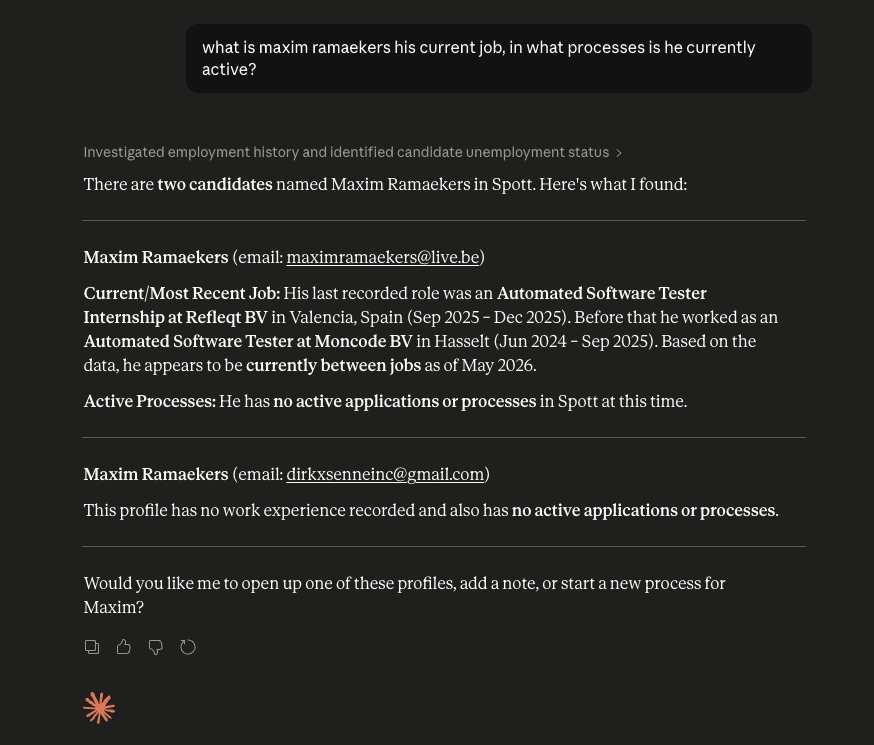
17. Find candidates by describing them, not by keyword
Ask: "Find every CFO candidate we've spoken to in the last 12 months interested in PE-backed roles."
Skip the search operators. Describe the person you need in plain language, and the assistant surfaces matches from everything in your database, including the notes and conversations a keyword search would miss. It is the fastest way to answer "who do we already know for this?", and it builds on how Spott's AI finds the best candidates.
18. Get a full client briefing before every call
Ask: "Summarise all our interactions with [Company] and draft talking points for my call."
Walk into every client call fully prepped. The assistant pulls together every email, note, and meeting, then hands you a summary and talking points, so a five-minute read replaces an hour of digging. Your team looks sharp and prepared, every time.
19. Write your weekly numbers in seconds
Ask: "Generate this week's business review: placements, conversion rates, and recruiter performance by industry."
Turn your live activity into a leadership-ready update on demand. Instead of pulling numbers together by hand, just ask, and get placements, conversion rates, and how each part of the team is doing, drawn straight from your workspace. Perfect for Monday standups and board updates.
20. Spot stalled placements and draft the follow-ups
Ask: "Identify all stalled placements where candidate contact lapsed 14+ days ago and draft a follow-up for each."
Let the assistant do the watching. It finds the deals going quiet and drafts a follow-up for each one, so re-engaging is a quick review-and-send instead of a research project. Pair it with the sleeping-candidate rule (number 7) and very little falls through the cracks.
Which automations should you build first?
You do not need all 20 on day one. A simple order that works for most agencies:
- Start with the busywork that steals recruiter time. The background and scheduled rules (1 to 4, 7, 8) remove the most repetitive admin and pay off straight away. No code, minutes to set up.
- Then connect the tools your team already lives in. If wins should show up in Slack or placements should reach finance, add webhooks 9 and 10.
- Bring in the API when you have a custom system to connect: your careers site, a client portal, an old database, or a specialist tool (13 to 16). This is the one to raise with a developer, or with us.
- Turn on the AI assistant for the thinking work. Search, briefings, weekly numbers, and follow-ups (17 to 20) are the fastest wins for owners and senior recruiters, and there is nothing to build.
The agencies pulling ahead are not the ones with the most features. They are the ones who quietly handed the repetitive work to their ATS so recruiters can spend their time on relationships and placements. That is the whole point of an AI-native ATS: the platform works alongside you instead of waiting for input.
Build your first automation this week
You do not have to be technical to get value from any of this. Between the no-code suite and the AI assistant, most of the wins on this list are a few clicks away, whether you are a solo desk or a firm of 200 recruiters.
Want to see which automations would save your team the most time? Book a demo and we will walk through your workflow and set the first ones up with you.

Frequently Asked
Spott gives you four ways to automate recruiting work. The no-code automation suite runs simple "when this happens, do that" workflows in the background (an application moves stage, a candidate is placed, a job is created). Webhooks let Spott tell your other tools when something happens, so systems like Slack or your invoicing tool react automatically. The API is for building deeper custom connections when you need them. And the MCP server connects Spott to Claude or ChatGPT so anyone on your team can get work done just by asking. Most agencies start with the no-code suite and grow from there.
Mostly no. The no-code automation suite is built by an admin under Settings, with no code at all. Connecting Spott to Claude or ChatGPT also takes no code, just a couple of minutes to set up. You only need a developer for the more custom work: deeper integrations built on the API, or sending Spott's events into your own systems through webhooks.
Every automation is one trigger, one or more actions, and optional conditions. Triggers fire on things that happen in your workspace, like an application moving stage, a candidate or job being created, or a candidate being placed. Actions include sending an email from your own address, updating a field, or opening the right window for a recruiter to finish a step. The list keeps growing, so check Settings > Automations for what is available today. Automations apply to your whole workspace, so build them as shared team rules.
Think of the API as something you build once with a developer: it connects Spott to another system so data flows between them automatically. The MCP server is something any recruiter can use straight away: it plugs Spott into Claude or ChatGPT so you can search, summarize, and draft in plain language, no code required. The API is for custom integrations; MCP is for everyday AI-assisted work.
In Claude or ChatGPT, add Spott as a connector, point it at https://mcp.spott.io/mcp, and sign in with your normal Spott login. It takes a couple of minutes and needs no code. Everyone only sees the data they already have access to in Spott, so it is safe to roll out across the team. From there you can ask it to find candidates, summarize your history with a client before a call, draft outreach, or flag placements that have gone quiet.




Outp(l)ace everyone.
You can’t win tomorrow’s placements
with yesterday’s tools.